ပစ္စည်းတစ်ခုချင်း ဈေးလျော့ပေးနည်း
By Thu Thu Mon on February 2, 2021
BeginnerSale Invoice ဖွင့်ရာတွင် Item တစ်ခုခြင်းအလိုက် Discount ပေးလိုပါက ........
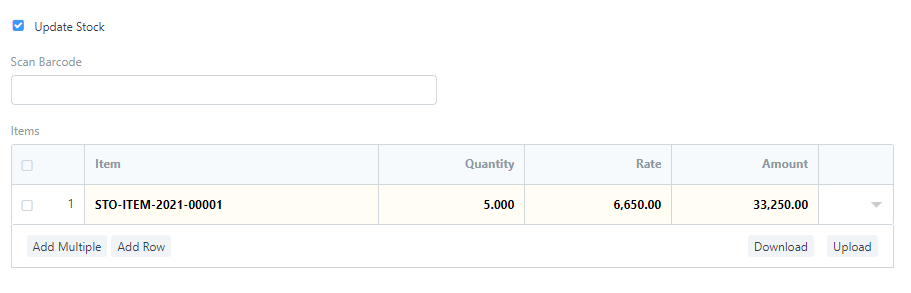
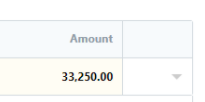
Discount ပေးလိုသော item ကို ရွေးချယ်ပြီးပါက Amount Column ဘေးမှ Down Arrow ပုံလေးကိုတစ်ချက်နှိပ်ပါ။
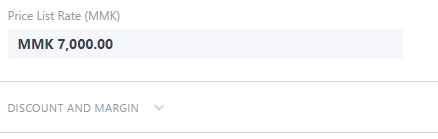
DISCOUNT AND MARGIN ကိုတစ်ချက်နှိပ်ပါ။
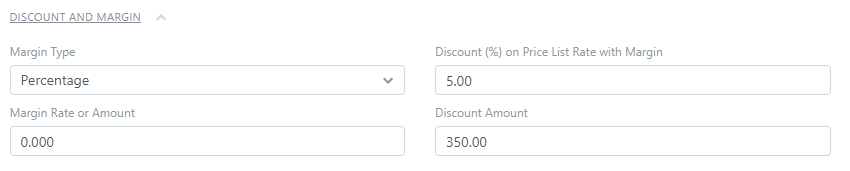
Margin Type တွင် Percentage or Amount ရွေး၍ Discount ပေးနိုင်ပါသည်။
% ဖြင့်Discount ပေးလိုပါက Discount (%) on Price List Rate with Margin တွင် Discount ပမာဏ ထည့်ပါ။
Discount Amount တွင် Discount ချလိုက်သော ပမာဏ ကို ဖော်ပြပေးမည်ဖြစ်သည်။
Amount တွင် Discount ချပြီး သား ကျသင့်ငွေ ပမာဏ ကို ပြပေးမည်ဖြစ်သည်။
Was this article helpful?
No comments yet. Login to start a new discussion Start a new discussion