Payment Cash Discount ပေးနည်း
By Thu Thu Mon on January 28, 2021
Intermediate
Customer မှ Invoice အလိုက် ငွေချေ ရာတွင် Payment Discount ပေးလိုပါက.....
Accounting > Payment Entry ကို နှိပ်ပါ။
New ကိုနှိပ်ပါ။
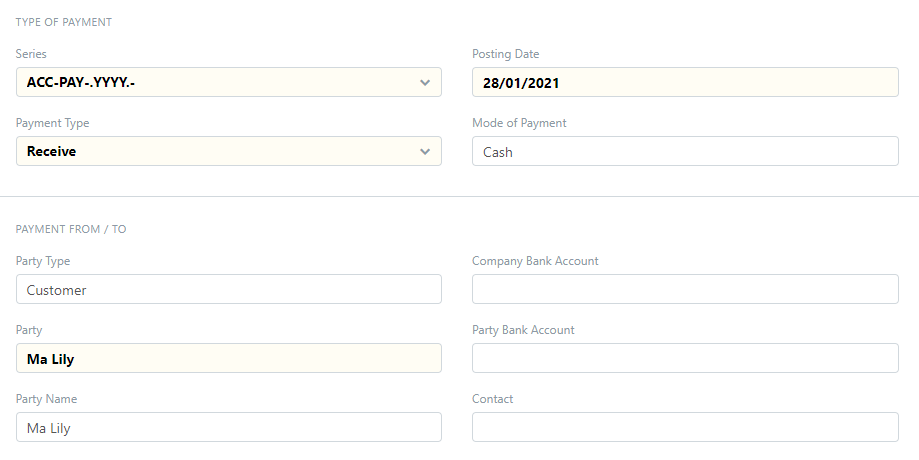
Payment Type တွင် ငွေလက်ခံရပါက Receive ကိုရွေးပါ။
Party Type တွင် Customer ကိုရွေးပါ။
Party တွင် Customer Name ကိုရွေးပါ။
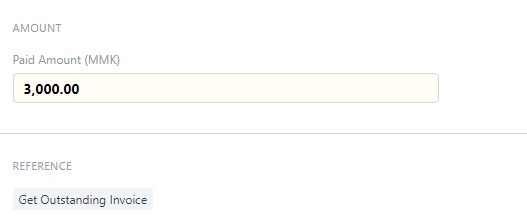
ငွေလက်ခံရသော Amount ကိုထည့်ပါ။ (Cash Discount ချပြီးသော Amount)
Get Outstanding Invoice ကိုနှိပ်ပါ။

Get Outstanding Documents ကိုထပ်နှိပ်ပါ။
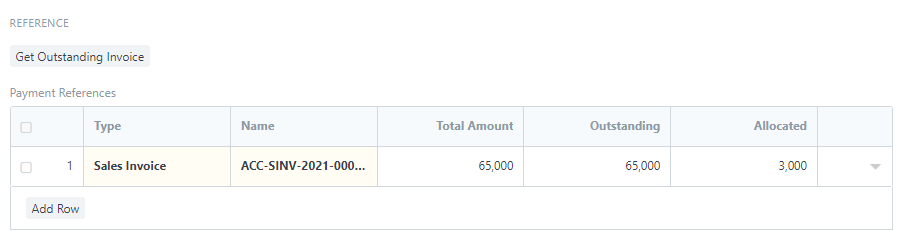
၀ယ်ယူထားသော Sale Invoice များ ကျလာမည်ဖြစ်သည်။

Allocated Amount တွင် Invoice Amount အပေါ်တွင် Discount ပေးမည်ဖြစ်သောကြောင့် Invoice Amount အတိုင်းထည့်ပေးရမည်။
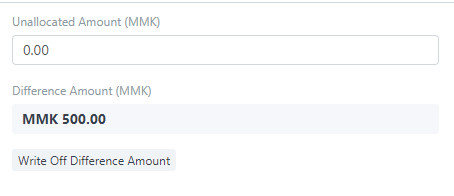
Cash Discount 500 လျော့၍ ငွေလိုက်သောကြောင့် Difference Amount တွင် MMK 500 ပြပေးသည်။
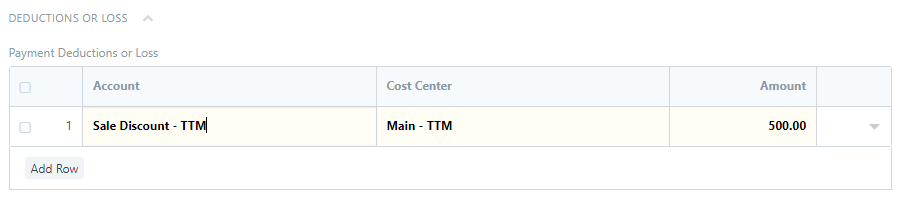
Write off Difference Amount ကိုနှိပ်၍ Sale Discount Account တွင် Cash Discount Amount ကိုပြပေးမည်ဖြစ်သည်။
Was this article helpful?
No comments yet. Login to start a new discussion Start a new discussion